

Automate AI Record Summaries in HubSpot with Workflows
A workflow that writes a plain summary of any HubSpot record and drops it into an internal email, Slack or a property, with the credit maths and the check for when the credits run out.

Updated 24 November 2026. HubSpot now calls the assistant Breeze Assistant (it was Breeze Copilot), the Summarize record action needs a Professional or Enterprise hub, and every run uses HubSpot Credits. This page now covers the credit maths and what happens when the credits run out.
HubSpot can write an AI summary of a contact, company, deal or ticket automatically: add the Summarize record action to a workflow, then drop its Object summary output into an internal email, a Slack message or a property. It needs a Professional or Enterprise hub, and each run uses 10 HubSpot Credits from your monthly allowance.
The point is that nobody has to open the record to know what has happened on it. A rep picking up a new lead, an account manager taking over a customer, or a support lead looking at an escalated ticket gets a short summary of the activities, notes and ownership in the place they already read.
What does the Summarize record action do?
It reads the enrolled record, and any associated records you add as data sources, and writes a plain summary of its activity, notes and ownership. The summary is an output of that workflow step, so any later action in the same workflow can use it. HubSpot still labels the action as beta.
The name has moved around. The assistant inside HubSpot was Breeze Copilot and is now Breeze Assistant, which is the name HubSpot's product catalogue uses. The workflow action itself is called Summarize record in every version, and it sits in the AI section of the action list.
Steps and credit use from HubSpot's knowledge base and Product and Services Catalog, checked 24 November 2026. If the account is out of credits the action fails and the output is empty.
Which HubSpot plans include it?
Any Professional or Enterprise subscription to Marketing Hub, Sales Hub, Service Hub, Data Hub, Smart CRM or Revenue Hub, according to HubSpot's guide to summarising data in workflows. Starter does not get it. Two settings also have to be on in your AI settings: giving users access to generative AI tools and features, and CRM data. You need Super Admin or Workflows permissions to build it.
On Marketing Hub Enterprise the same action can also write personalised content for automated marketing emails. That is a different use with a different risk, because the output goes to a customer instead of your own team, so test it separately.
What does each summary cost in HubSpot Credits?
HubSpot's Product and Services Catalog charges 10 credits each time a workflow runs one AI action. A Professional subscription includes 3,000 credits a month and Enterprise includes 5,000, shared across every AI feature in the account. Credits reset each month and unused ones do not roll over.
| Summaries a month | Credits used | Share of a Professional allowance (3,000) |
|---|---|---|
| 50, one per new deal | 500 | About 17% |
| 150 | 1,500 | 50% |
| 300, every enrolled contact | 3,000 | All of it |
The arithmetic is simple. The trap is that a broad trigger, such as every new contact, can spend a month's credits on summaries nobody reads, and the agents and other AI features you pay for then stop. Our breakdown of what HubSpot Credits cost next to your own API key works through the bigger picture, and what HubSpot's AI agents cost to run covers the features competing for the same allowance.
How do you set up an automatic record summary?
- Go to Automation > Workflows and create a workflow on the object you want summarised: contact, company, deal or ticket.
- Set a narrow enrolment trigger. Good ones are a deal reaching a stage, a contact being assigned to a rep, or a ticket being escalated. If the record itself has to exist first, here is creating the lead record automatically in HubSpot.
- Click the + icon, expand the AI section and choose Summarize record. Pick the object to summarise, and use More data if you want associated records included.
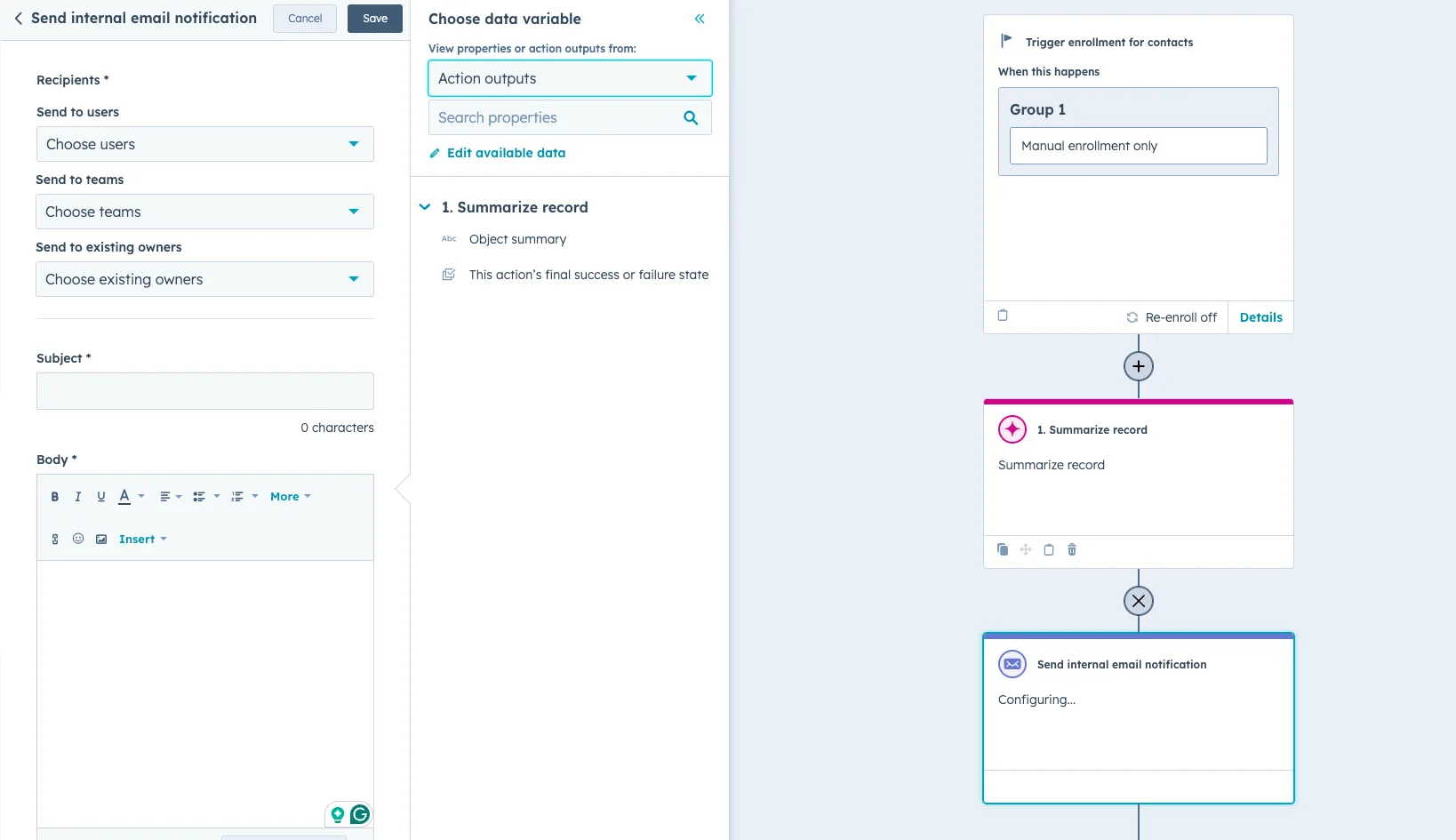
- Add the action that delivers it, such as Send internal email notification or Send Slack notification. Click into the message body, open Action outputs in the data panel, choose Summarize record and then Object summary.
- Save, enrol a handful of test records by hand, and read the summaries before you turn the workflow on.
Not sure your team would trust an AI summary?
Talk to Matt about which records your team would actually read a summary of. He can explain how we work and whether our HubSpot services fit what you need.
What happens when the credits run out?
The action fails and every later step that uses its output gets an empty value, HubSpot's guide says. The workflow keeps going, so the rep still gets the email, with a blank where the summary should be. Two habits stop that from going unnoticed: put a branch after the action that checks the summary is not empty before anything is sent, and have one named person watch the credit usage page each month. Billing contacts get emails at 75%, 85% and 90% of the limit, according to HubSpot's credits and billing guide.
Which records are worth summarising?
The ones where somebody new picks the record up, and the ones where the value of the deal pays for the reading. A sales team we work with looked at this action when it came out and chose to run it on high-value prospects only, instead of every contact. That is the pattern we would start with too: hand-overs between people, deals above a set amount, and escalated tickets.
If you need the output in a fixed shape, for example three headings your reps always read in the same order, Summarize record is not very configurable. HubSpot's Data Agent custom prompt action, also beta and also on credits, lets you write the instructions yourself and map the answer to a property. Our guide to choosing between a HubSpot AI agent and a simple workflow helps decide how much AI a job needs, and the same idea applied before a call is in getting a 30 second pre-call brief from any HubSpot deal. If more than one person needs to see the summary, see notifying several owners of a deal change.
Does an AI summary raise privacy questions in Australia?
Yes, because it is written from notes, emails and call records, which are personal information. Under the Privacy Act 1988, the Australian Privacy Principles still apply when a workflow does the reading: APP 6 limits how you use the information, and APP 11 requires you to keep it secure. In practice, send the summary only to people who already have a reason to open the record, and keep it inside HubSpot and your own Slack workspace instead of forwarding it to an outside address.
HubSpot lets an admin control which AI features users can reach and what CRM data is shared with them, from the account's AI settings. The OAIC's guidance on commercially available AI products is the reference if you need to check a specific case, and our post on where your data goes when you use AI lists the questions to ask a vendor.
Frequently asked questions
Is Breeze Copilot the same as Breeze Assistant? Yes. HubSpot renamed its in-app AI assistant from Breeze Copilot to Breeze Assistant. The Summarize record workflow action works the same way under either name.
Can HubSpot Starter summarise records in a workflow? No. The Summarize record action needs a Professional or Enterprise subscription to Marketing, Sales, Service, Data or Revenue Hub, or Smart CRM.
How many credits does a record summary use? 10 HubSpot Credits each time the workflow runs the action, from an allowance of 3,000 a month on Professional and 5,000 on Enterprise.
Can the summary be saved on the record? Yes. Any later workflow action that uses the data panel can take the Object summary output, including one that copies it to a custom property.
Set it up on one object first, watch whether people read the summaries, then decide where else it is worth running. If you want this built across several objects with the credit checks in place, that is how we build AI actions like this, alongside our RevOps and HubSpot work. Neighbourhood has worked with 300+ businesses since 2015.
Wondering which records are worth summarising?
Talk to Matt about where summaries would save your team time. He can explain how we work and whether our HubSpot services fit what you need.
Sources
- Use HubSpot's AI to summarize data in workflows, HubSpot Knowledge Base, updated 3 August 2026, checked 24 November 2026.
- Choose your workflow actions, HubSpot Knowledge Base, for the AI actions list and their beta labels.
- Manage HubSpot Credits, HubSpot Knowledge Base, updated 12 November 2026.
- HubSpot Product and Services Catalog, for credits per AI workflow action and included credits by tier.
- Australian Privacy Principles quick reference, OAIC.